A Complete Guide to CRM Systems and Database Management
 Jeremy Wayne Howell : Jul 22, 2026 9:48:31 PM

If NetSuite REST web services record update performance is slowing down your integration pipelines, here is what is most likely causing it — and what you can do about it:
| Root Cause | What It Means | Quick Fix |
|---|---|---|
| One record per request limit | REST API processes updates one at a time | Use async batch PATCH with up to 100 records |
| Concurrency limits | Accounts max out at 15–55 concurrent threads | Add SuiteCloud Plus licenses or stagger requests |
| Server-side scripts/workflows | User event scripts run on every update | Profile and optimize or conditionally bypass |
| Payload bloat | Sending unnecessary fields slows processing | Use fields parameter to limit response size |
| No idempotency handling | Retries create duplicate records | Use X-NetSuite-Idempotency-Key header |
| Synchronous-only pattern | Waiting on each response blocks throughput | Use Prefer: respond-async for bulk jobs |
Here is the frustrating reality: NetSuite’s REST API is genuinely capable of handling high-volume record updates — but it has hard architectural constraints that most integrations are not designed around. When those constraints are ignored, throughput collapses, 429 errors pile up, and developers are left chasing symptoms instead of root causes.
The API processes one record per create or update request. Batch deletes can handle up to 1,000 records. But updates? One at a time — unless you use asynchronous batch operations, which cap at 100 records and require a different request pattern entirely.
That gap between expectation and architecture is where most performance problems live.
I’m Jeremy Wayne Howell, founder of The Way How, and while my core work is revenue architecture and buyer psychology, I’ve spent years inside the systems — including integration design and ERP data flows — that either accelerate or quietly strangle business growth. Understanding NetSuite REST web services record update performance is not just a developer problem; it is a revenue problem, and this guide treats it that way.
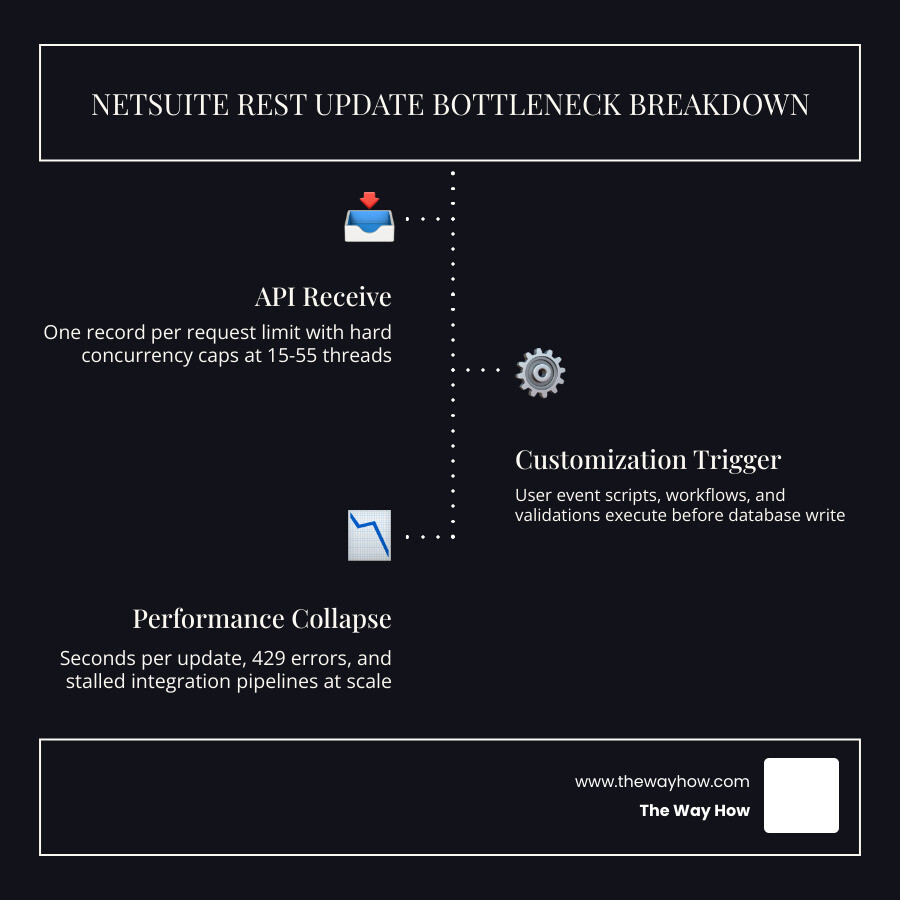
When an integration takes several seconds to update a single customer or sales order, we often blame the network or NetSuite’s server infrastructure. However, the root cause is rarely the API endpoint itself. The true bottleneck is almost always what happens after the API receives the payload.
Every time a REST update request hits NetSuite, the system does not just write data to a database. It initializes the record, triggers user event scripts, runs workflows, performs native validation, and calculates dependent fields. If your NetSuite account has heavy customizations, a simple REST update can trigger a massive waterfall of server-side operations.

When we look at NetSuite performance through a behavioral lens, we realize that human systems and software systems fail for similar reasons: they are overloaded with uncoordinated instructions. In NetSuite, this takes the form of unoptimized User Event scripts and Workflows.
By default, any REST update (using the PATCH method) triggers the standard execution path. This includes:
beforeLoad scriptsbeforeSubmit scriptsafterSubmit scriptsIf a single afterSubmit script takes 1.5 seconds to run because it performs slow searches or loads unrelated records, your API response time will be at least 1.5 seconds. Multiply this by thousands of updates, and your integration grinds to a halt.
To optimize this, we must profile our scripts using the Application Performance Management (APM) tool. If certain scripts do not need to run during automated integration updates, we can bypass them. We can write code in our User Event scripts to check the execution context:
By filtering out non-essential business logic during API updates, we can instantly reclaim massive amounts of processing time.
There is a common cognitive trap in integration architecture: the belief that adding more parallel threads will naturally solve throughput issues. In reality, throwing more threads at a slow system often makes it worse.
When multiple threads attempt to update the same records or related records simultaneously, NetSuite experiences database contention. This leads to database locks. If Thread A is updating a Customer record, and Thread B tries to update a Sales Order belonging to that same Customer, Thread B may be forced to wait for Thread A to release its lock.
If execution speed per record is slow, threads hold onto database locks longer. This causes thread starvation, where your integration client is waiting on blocked threads, eventually leading to timeout errors and integration failure. True optimization requires us to first improve individual record execution speed before scaling up concurrency.
To build high-performance integrations in June 2026, we must design our architecture around NetSuite’s specific REST rules. For a comprehensive look at how these pieces fit together, you can read more in this guide on Optimizing High-Volume NetSuite REST API Integrations | Houseblend.
One of the simplest ways to improve performance is to send less data. A common mistake is retrieving a record, modifying a few fields, and sending the entire record back in a PUT request.
In NetSuite, PUT replaces the entire record, which is both dangerous and slow. Instead, we should always use the PATCH method. PATCH only updates the fields we explicitly provide in our request body, leaving other fields untouched.
Furthermore, we should use the fields query parameter to limit the response payload. If we only need to verify that an update was successful, we do not need NetSuite to return the entire updated record in the response. By restricting the returned fields, we drastically reduce payload size and JSON parsing overhead on both ends.
For details on the exact mechanics of updating individual records, refer to the official documentation on NetSuite Applications Suite - Updating a Record Instance.
If your business processes do not require immediate confirmation of a record update, synchronous processing is a waste of resources. Waiting for NetSuite to finish processing a record before sending the next one creates a massive bottleneck.
Instead, we can use asynchronous processing. By adding the Prefer: respond-async header to our REST requests, NetSuite will immediately accept the payload, write it to a queue, and return an HTTP 202 Accepted status along with a job status URL.
Our integration can then poll the status URL periodically to check when the processing is complete. This decouples the integration client from NetSuite’s internal processing speed, allowing us to dump large amounts of updates into the queue without blocking our local application threads. For a deeper dive into setting up these headers and managing async jobs, consult the NetSuite REST API: Complete Developer Guide (2026) | BrokenRubik.
Understanding NetSuite’s rate limits is essential for maintaining system stability. NetSuite does not use simple frequency limits (like 100 requests per minute) for its REST API. Instead, it relies on concurrency limits.
Your concurrency limit is the maximum number of API requests that NetSuite will process at the exact same millisecond.
If your integration attempts to send 12 requests at once on an account with a concurrency limit of 10, NetSuite will immediately reject the extra 2 requests with an HTTP 429 Too Many Requests error.
To manage this pool effectively, we should implement connection pooling and HTTP keep-alive on the integration client. This keeps TCP connections warm, reducing the overhead of repeated TLS handshakes and ensuring that our requests flow smoothly through our allocated threads.
When your integration encounters an HTTP 429 error, the way it responds determines whether your system recovers or crashes. A poorly designed integration will immediately retry the failed request, creating a “thundering herd” effect that keeps the concurrency pool permanently saturated.
We must implement a client-side queuing mechanism with exponential backoff and jitter. When a 429 error is received, the client should parse the Retry-After header sent by NetSuite, which tells us exactly how many seconds to wait before trying again. If the header is missing, we should back off exponentially (e.g., waiting 1 second, then 2 seconds, then 4 seconds) and introduce a small random delay (jitter) to prevent synchronized retries.
When dealing with thousands of record updates daily, we must design for data integrity and network reliability.
In a perfect world, networks never drop connections. In the real world, a network timeout might occur after NetSuite successfully updates a record but before it can send the confirmation back to your client. If your client retries the update, it might run expensive server-side scripts all over again, or worse, create duplicate sublist items.
To prevent this, we should always use the X-NetSuite-Idempotency-Key header. This header accepts a unique UUID generated by your integration client.
If NetSuite receives an update request with an idempotency key it has already processed within the last block of time, it will not re-run the update. Instead, it will simply return the cached response from the first successful execution. This guarantees transaction safety even in highly unstable network environments.
While standard REST web services process one record per request for single operations, NetSuite supports batch operations for collections. Using the correct content-type header:
Content-Type: application/vnd.oracle.resource+json; type=collection
We can send a batch of up to 100 updates in a single HTTP PATCH request, provided we run it asynchronously using the Prefer: respond-async header.
This batch execution runs in parallel on NetSuite’s side. However, keep in mind that batch updates are restricted to a single record type per request (for example, you can batch update 100 Customers, but you cannot mix Customers and Sales Orders in the same payload). For details on how to structure these payloads, check the documentation on NetSuite Applications Suite - updateList.
Architects often ask whether standard REST web services are truly the best choice for high-volume updates compared to older SOAP endpoints or custom RESTlets.
| Integration Method | Payload Format | Batch Limit | Custom Logic Handling | Setup/Maintenance Overhead |
|---|---|---|---|---|
| SuiteTalk REST | JSON | 100 records (Async only) | Native triggers only | Low (No code required) |
| RESTlets | JSON / Text | Custom-defined | High (Fully scriptable) | High (Requires SuiteScript) |
| SuiteTalk SOAP | XML | 1,000 records | Native triggers only | Medium (Complex XML schemas) |
Standard REST web services are fantastic because they require no custom server-side code. They are discoverable, standardized, and automatically support new records as NetSuite releases them.
However, if you need to execute complex, multi-record business logic in a single round-trip, RESTlets are still highly relevant. Because RESTlets are custom SuiteScripts that you write and deploy inside NetSuite, you can design them to accept a highly optimized, custom JSON payload, perform multiple database lookups, and update several records in a single execution thread.
Use RESTlets when you need to bypass standard API constraints or when you need custom-scripted batching logic that standard REST endpoints do not support.
If you are still running legacy SOAP (XML) integrations, migrating to REST should be a priority. While SOAP’s updateList operation technically allows up to 1,000 records per request, the sheer size of XML payloads makes them incredibly resource-intensive to parse.
JSON payloads used by REST web services are significantly lighter, requiring less bandwidth and lower CPU overhead for serialization and deserialization. By moving to REST, you gain access to modern API features like native metadata discovery, OpenAPI specifications, and simpler authentication models like OAuth 2.0.
For legacy context on how updates were historically structured, you can review the technical details in NetSuite Applications Suite - updateor Section n3527090.html.
Implement client-side rate limiting to stay within your account’s concurrency limits. If you do hit a 429 error, read the Retry-After header to see how long you need to pause, and implement an exponential backoff strategy with jitter to stagger your retries.
No. Standard NetSuite REST batch updates are limited to a single record type per collection request. If you need to update different record types in a single call, you must either send separate requests or build a custom RESTlet to handle the multi-record logic.
User event scripts execute synchronously during the REST update transaction. If you have scripts that perform slow database queries or load heavy records, they will directly increase your API response times. Use the APM tool to identify slow scripts and bypass them for the REST_WEBSERVICES execution context when possible.
At The Way How, we look at systems holistically. When an integration is slow, it is rarely just a technical glitch. It is a point of friction that creates uncertainty across your entire business.
Slow updates mean delayed inventory numbers, lagging customer data, and sales teams working with outdated information. This friction erodes trust—both your customer’s trust in your brand and your team’s trust in your internal systems.
We help leadership teams remove this uncertainty. By diagnosing the behavioral and architectural gaps in your revenue systems—from your HubSpot setup to your NetSuite data pipelines—we design predictable growth engines that run smoothly.
If you are ready to stop chasing temporary technical fixes and want to build a reliable, high-performance revenue architecture, we should talk. Learn More info about our revenue architecture services and let’s bring clarity back to your business operations.
 Jeremy Wayne Howell : Jul 22, 2026 9:48:31 PM
 Jeremy Wayne Howell : Jul 21, 2026 9:47:10 PM
 Jeremy Wayne Howell : Jul 17, 2026 5:45:00 AM