How to Master PageSpeed Insights Mobile and Desktop Reports
 Jeremy Wayne Howell : Jul 21, 2026 9:47:10 PM

A CRM database is the central system where every customer interaction, contact detail, purchase record, and communication history lives — organized, searchable, and accessible across your entire business.
If you just need the quick answer:
| What it is | A structured repository of all customer data inside your CRM system |
|---|---|
| What it stores | Contacts, purchase history, communication logs, service requests, lead status |
| Who uses it | Sales, marketing, customer service, and leadership teams |
| Why it matters | Enables personalization, faster service, and data-driven decisions at scale |
| Main types | Operational, Analytical, Collaborative, Strategic |
Customer data has never been more complex — or more consequential. Customers now interact with businesses across email, social media, live chat, phone, and messaging apps. They expect to be remembered. They expect relevance. According to research, 73% expect better personalization, and 81% expect faster service as technology advances.
And yet, for most founders and revenue leaders, the reality looks nothing like that.
It looks like scattered spreadsheets. Duplicate contacts. Sales reps guessing at follow-up timing. Marketing teams emailing the wrong segment. Support agents asking customers to repeat themselves — again.
The problem isn’t that your team isn’t trying hard enough. The problem is that your data has no home.
That’s exactly what a well-structured CRM database solves. Not just by storing data — but by transforming disconnected information into a single, reliable source of truth that every team can act on with confidence.
I’m Jeremy Wayne Howell, founder of The Way How, and over the past 20+ years I’ve helped businesses implement and optimize CRM database systems — including HubSpot CRM architecture — that reflect how buyers actually think and behave, not just how org charts are drawn. This guide will walk you through everything you need to know to build, migrate, and maintain a CRM database that drives real revenue clarity.
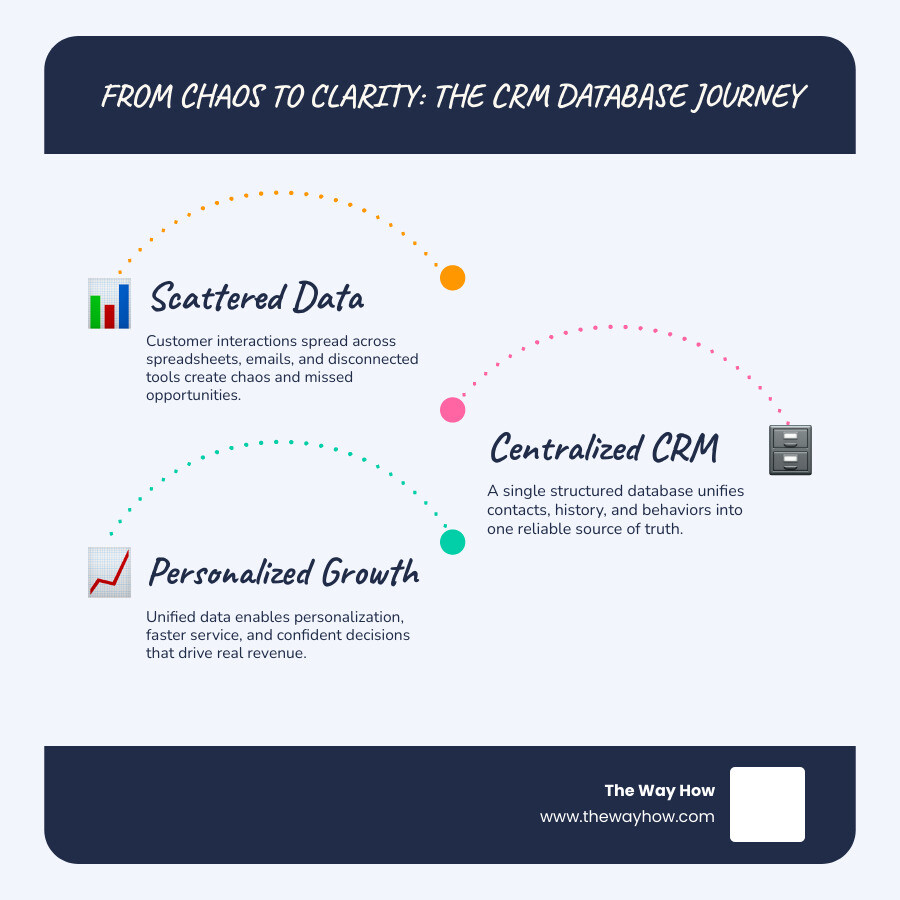
At its core, a standard relational database is built to store static records. It handles columns, rows, and basic queries beautifully. If you need to track inventory levels or log server performance, a standard SQL database is perfect. But your customers are not static inventory items. They are dynamic human beings with shifting preferences, emotions, and behaviors.
A crm database is a specialized customer relationship management tool that collects every interaction a business has with its customers in one place. Unlike a standard database, which requires manual query building to make sense of information, a CRM database is built with a native application layer. It links disparate data points—like an opened marketing email, a website visit, a sales call, and a support ticket—into a unified, real-time chronicle of the customer journey.
This centralization creates a single source of truth. When data is siloed across different departments, your customers experience friction. A sales rep might call a prospect to pitch an upgrade, completely unaware that the prospect has an open, unresolved high-priority support ticket. By using a unified crm database, you eliminate these blind spots. You can read more about how this impacts leadership decisions in our guide to CRM for Founders.
To explore this concept further, you can read the comprehensive overview of CRM data structures on What Is a CRM Database? (A Comprehensive Guide) | Salesforce.
Inside a modern crm database, data is structured to mirror real-world business relationships. It goes far beyond a flat list of names and email addresses. The foundational elements typically include:
To understand how these tables connect programmatically, developers often look at real-world database architectures. For instance, the FluentCRM Database Schema | FluentCRM Developers illustrates how custom tables are utilized to handle subscribers, tags, campaigns, and funnel metrics without relying solely on standard web platform tables.
A robust crm database does not just store data; it serves different functions depending on how your business needs to grow. It supports four distinct categories of CRM strategy:
Most businesses design their database schemas around internal processes. They create fields for “Lead Stage,” “Deal Value,” and “Contract Signed Date.” While these are necessary for reporting, they completely ignore the psychological journey of the buyer.
To build a crm database that actually drives revenue, you must map your database schema to human behavior. Every data field should capture a moment of transition, a level of intent, or an emotional state.
For example, tracking a prospect’s “last website visit” is a basic technical metric. But tracking which high-intent pages they visited (like your pricing or security page) tells you something about their decision-making psychology. By categorizing these touchpoints, your CRM can automatically surface the right context to your sales team at the exact moment they need to build trust.
We call this approach behavioral database design. You can explore how we apply these psychological principles to system design in our articles on Real People CRM Behavioral Science and Real People CRM Empathy Features.
When translating these behavioral touchpoints into actual database architecture, developers must map relationships between tables carefully. For example, the developer documentation on Database Schema :: SuiteCRM Documentation shows how relationships are managed at the application level rather than through database-level foreign key constraints, allowing for highly flexible custom fields that adapt to complex human interactions.
When choosing a crm database solution, founders and technical teams must decide where their data will live. This decision impacts your security, customization capabilities, and ongoing maintenance costs.
For organizations looking to customize their own architecture, platforms like The #1 Open Source CRM | Odoo offer modular, flexible systems that grow alongside your operations. Alternatively, platforms like Zoho CRM | Top-rated Sales CRM Software by Customers provide highly secure, cloud-based AI tools that require zero local server management. If you are considering building a custom solution from the ground up, read our guide on Developing a CRM.
Here is how these database options compare:
| Feature | Cloud-Based (SaaS) | On-Premise | Open-Source |
|---|---|---|---|
| Setup Speed | Minutes | Weeks to Months | Days to Weeks |
| Maintenance | Handled by provider | Handled internally | Handled internally |
| Customization | High (via APIs/Apps) | Moderate | Unlimited |
| Security Control | Shared responsibility | Complete internal control | Complete internal control |
| Pricing Model | Monthly subscription | Large upfront licensing | Free core, developer costs |
Moving your data from legacy systems, spreadsheets, or an outdated CRM into a new crm database is a high-stakes project. If done poorly, you risk losing critical historical context, creating duplicates, and frustrating your sales team.
To prevent this, we recommend a strict, four-step ETL (Extract, Transform, Load) process:

A successful migration requires a deep understanding of data integration. You can find detailed strategies for this phase in our resources on CRM Data Integration and HubSpot CRM Implementation.
A crm database is only as valuable as the quality of the data inside it. Over time, all databases experience “data decay”—contacts change jobs, email addresses bounce, and sales reps enter information inconsistently.
Without proactive data governance, your system will slow down, your marketing metrics will lie to you, and your team will lose trust in the tool.
To maintain a healthy database, establish these baseline practices:
By automating these tedious tasks, your team can focus on using data rather than cleaning it. Read more about how to set up these automated systems in our guides on CRM Workflow Automation and HubSpot CRM Strategy.
A standard database is a general-purpose storage engine that requires custom code and SQL queries to read, write, and display data. A CRM database is a specialized, relational database paired with an intuitive application layer, pre-built user interfaces, and automated workflows designed specifically for managing customer relationships and sales pipelines.
Regular maintenance involves setting up automated deduplication rules, running quarterly audits to remove inactive or bounced contacts, standardizing data entry formats through validation rules, and using data enrichment tools to automatically update missing company or contact information.
Yes. Modern CRM databases use robust APIs to connect with ERP systems, marketing automation platforms, accounting software, and customer support desks. This ensures that when a change occurs in one system, it is instantly reflected in your central customer record. For more on this, read our comprehensive overview of CRM Data Integration.
A chaotic database is more than just an operational headache. It is a source of profound strategic uncertainty. When your customer data is fragmented, you cannot accurately diagnose why sales are stalling, where your marketing spend is being wasted, or why customers are leaving.
At The Way How, we believe that clean data and human psychology go hand in hand. We help founders and leadership teams build HubSpot CRM Architecture and execute demand-generation strategies that turn messy data into predictable, behavior-driven growth engines.
If you are ready to stop fighting your spreadsheets and start building a system that drives real revenue momentum, we are here to guide you. Explore our CRM Consulting Services to learn how we can design a database tailored to your unique growth goals, or take your first step toward operational clarity and unlock predictable growth with HubSpot for Small Businesses.
 Jeremy Wayne Howell : Jul 21, 2026 9:47:10 PM
 Jeremy Wayne Howell : Jul 20, 2026 9:46:47 PM
 Jeremy Wayne Howell : Jul 17, 2026 5:45:00 AM